How to use TeamRedMiner with HiveOS while utilizing ProHashing?

DeafEyeJedi avatar
DeafEyeJedi
Archived posts: 32
Joined: May 26, 2022

Re: How to use TeamRedMiner with HiveOS while utilizing ProHashing?

by DeafEyeJedi · · Post #32873

*UPDATE*

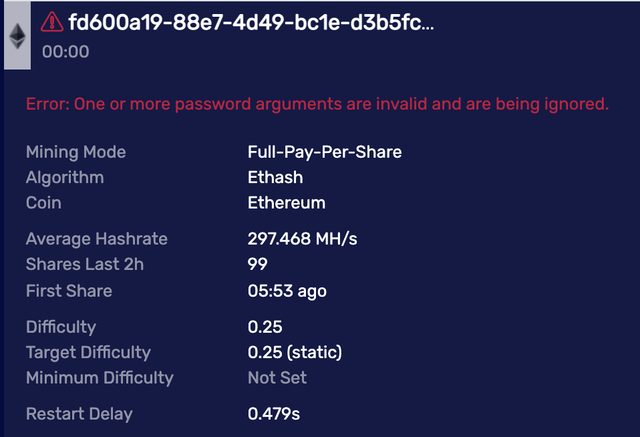
Alright so it ran overnight smoothly as expected. Now I decided to clean up the worker names and group them accordingly and for some reason now ProHashing is giving me error messages (but they are to be ignored) and still hashes away without issues.

While this may not be a big deal since it works but I would like to try and get their names to show up accordingly to make it easier for me to follow certain rigs.

Here's what I did:
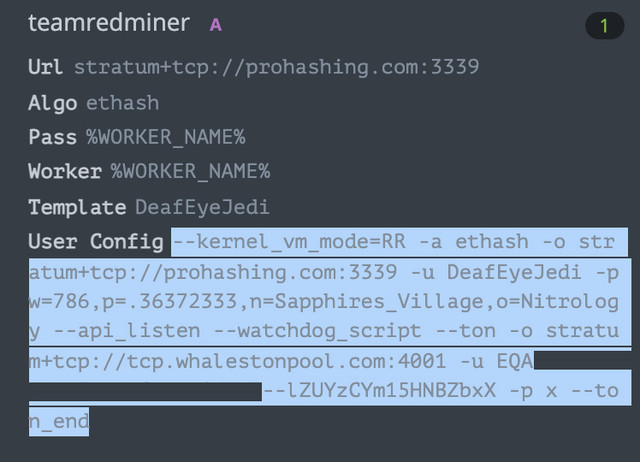
Code:

--kernel_vm_mode=RR -a ethash -o stratum+tcp://prohashing.com:3339 -u DeafEyeJedi -p w=786,p=.36372333,n=Sapphires_Village,o=Nitrology --api_listen --watchdog_script --ton -o stratum+tcp://tcp.whalestonpool.com:4001 -u EQA9( TON WALLET ) -p x --ton_end
Image

Image

Even more odd when I try to go back to the old names I had for each worker & group that I used from yesterday and they still won't show up either.

I've also tried rebooting all systems with no luck yet. What gives? :o
Baseball and Mining. HaCkint0sh and Crypto. Magic Lantern never dies! :geek:
TechElucidation avatar
TechElucidation
Archived posts: 44
Joined: Mar 18, 2022

Re: How to use TeamRedMiner with HiveOS while utilizing ProHashing?

by TechElucidation · · Post #32874

Hi,

If I had to guess what is happening is HiveOS is trying to configure TRM's user and password setting, and then is appending the settings you are putting in the "extra configuration arguments". Since TRM can handle a backup pool by listing two pools with the same arguments, this is allowed.

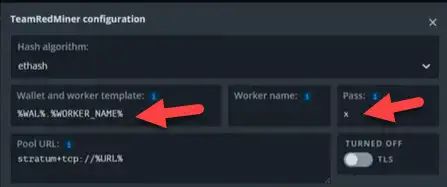
So taking another guess, in the main configuration you may have changed the "Wallet and worker template" to be your ProHashing username now, but left the "Pass" field as just 'x'?

Image

These would be treated as the "primary" pool for TRM, where the one in the Extra Configuration Arguments is the "backup". If I am correct, you used to have your ETH wallet address (or %WAL%) in there. That is why you had the login errors, because that was not a valid login on what TRM thought was your "Primary" pool, and so then started using the "Backup" from the extra arguments.

Now, if you have changed the Wallet to be your ProHashing user name, this is considered a valid login, but since the password is probably still 'x', it is not providing the names you want to use.

You can test this by making the Wallet name invalid again (just add some extra characters) and see if it starts working.

What you probably will have to do is put 'DeafEyeJedi' in the "Wallet and worker template", then in "Pass" put:

Code:

w=786,p=.36372333,n=Sapphires_Village,o=Nitrology
You could try it like that, then possibly try changing your extra arguments to:

Code:

--kernel_vm_mode=RR --api_listen --watchdog_script --ton -o stratum+tcp://tcp.whalestonpool.com:4001 -u EQA9( TON WALLET ) -p x --ton_end
This allows HiveOS to configure the ETH part itself, and this just adds the TON dual mining part.

If you want, message me directly in Discord, as that 'dings' my phone.
DeafEyeJedi avatar
DeafEyeJedi
Archived posts: 32
Joined: May 26, 2022

Re: How to use TeamRedMiner with HiveOS while utilizing ProHashing?

by DeafEyeJedi · · Post #32875

You're a genius. I knew it was somewhere around in that neighborhood. Because it worked for a second and then it would just go back to that long ugly random letters/numerics for each worker group.

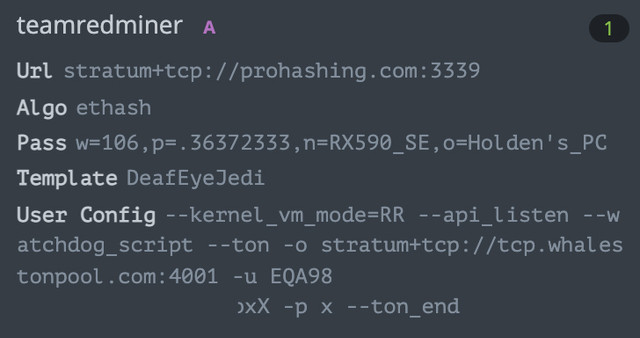
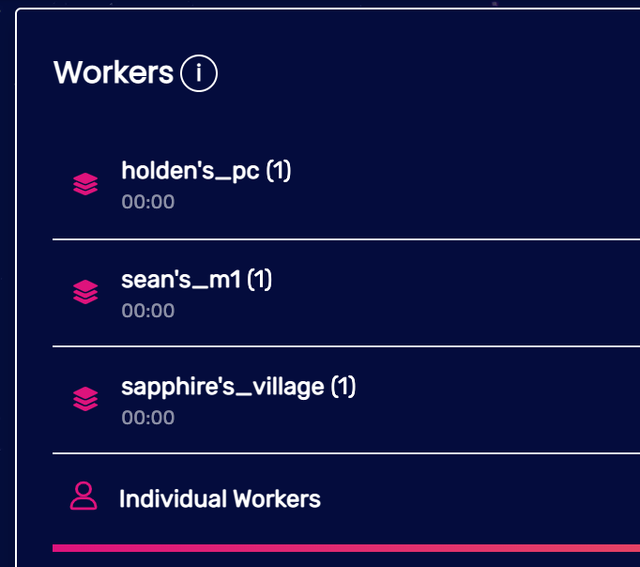
I've done the following per your advice and sure enough they all worked as expected. :mrgreen:

ImageImage

Thanks again for your prompt responses and I'll definitely be sure to add you in the discord for future references. Two thumbs up, sir! :D
Last edited Mon May 30, 2022 05:37 AM UTC by DeafEyeJedi; edited 2 time(s).
Baseball and Mining. HaCkint0sh and Crypto. Magic Lantern never dies! :geek: